Often changes on a service require a restart for them to take effect. This is common in things like web servers. Let’s take a look at a simple example:
---
- name: Install Web Server
  hosts: basics-host
  tasks:
    - name: Install Apache
      ansible.builtin.dnf:
        name: httpd
        state: latest
      register: httpd_install

    - name: Restart httpd
      ansible.builtin.service:
        name: httpd
        state: restarted
      when: httpd_install.changed
In this example we’re doing a simple web server install/update. This attempts to install the latest version of Apache on the server(hence the state: latest option on the DNF module). This first task will save the results of the run in the httpd_install variable.
In the second task I’m checking if the previous task had a changed condition, and if it did, it will restart the service to accept the changes. This is pretty straightforward, but what if there were multiple conditions that could cause a restart like so:
---
- name: Install Web Server
  hosts: basics-host
  vars:
    http_port: 80
  tasks:
    - name: Install Apache
      ansible.builtin.dnf:
        name: httpd
        state: latest
      register: httpd_install

    - name: Restart httpd
      ansible.builtin.service:
        name: httpd
        state: restarted
      when: httpd_install.changed

    - name: Apache alternate port
      ansible.builtin.lineinfile:
        dest: /etc/apache2/ports.conf
        regexp: "^Listen "
        line: "Listen {{ http_port }}"
        state: present
        create: yes
      register: alt_port

    - name: Restart httpd
      ansible.builtin.service:
        name: httpd
        state: restarted
        when: alt_port.changed
Now there’s a second task that could possibly require a service restart on change, so the same operation is required: run task, collect results in variable, check if variable changed and restart. Imagine if there were 10 tasks that could all possibly change the service, this is incredibly inefficient. That’s where handlers come in.
Let’s create a playbook based on the above, but make it use handlers instead. I’ll create a file in my git repository named basics-handlers.yml.
---
- name: Install Web Server
  hosts: basics-host
  become: true
  vars:
    http_port: 80
  tasks:
    - name: Install Apache
      ansible.builtin.dnf:
        name: httpd
        state: latest
      register: httpd_install
      notify: Restart httpd

    - name: Apache alternate port
      ansible.builtin.lineinfile:
        dest: /etc/apache2/ports.conf
        regexp: "^Listen "
        line: "Listen {{ http_port }}"
        state: present
        create: yes
      register: alt_port
      notify: Restart httpd

  handlers:
    - name: Restart httpd
      ansible.builtin.service:
        name: httpd
        state: restarted
Be sure to comment, commit, and push.
Notice how we removed the Restart httpd tasks. Instead they were replaced with a single notify option for each task that may need to be restarted and a single handler added in the handlers section (it is basically just another task). For any task that has a notify option, if the task detects a change it will call the handler once all tasks have been completed. A handler will only run ONCE no matter how many notify statements are issued.
Also note I added become: true to the playbook. This tells the playbook to do privilege escalation (sudo, run as administrator, etc.) for all tasks in the playbook. I could have put the become: true only on the tasks I wanted it to run on, but in this very small example it was easier to add it at the top so that it would be inherited by all tasks.
Let’s run the playbook:
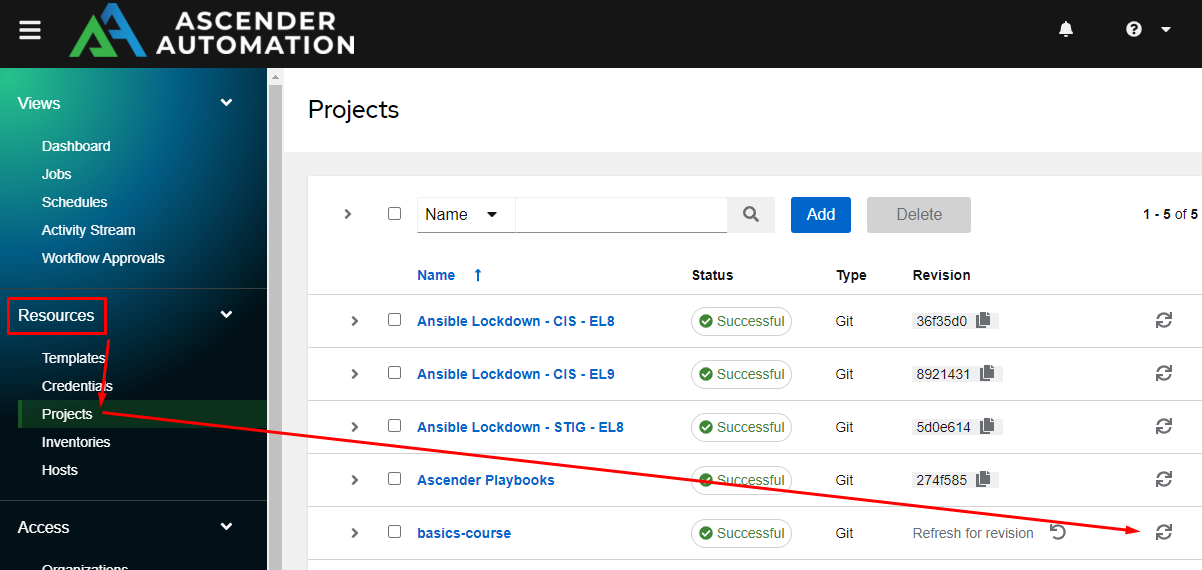
Don’t forget to go to Resources, Projects, and sync project so the playbook will show up.
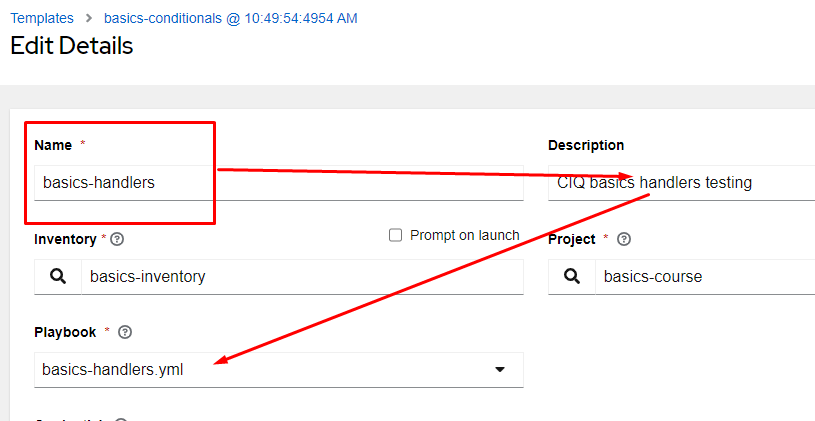
I’ll copy a job template, and adjust it for the new playbook:
Now launch the job template:
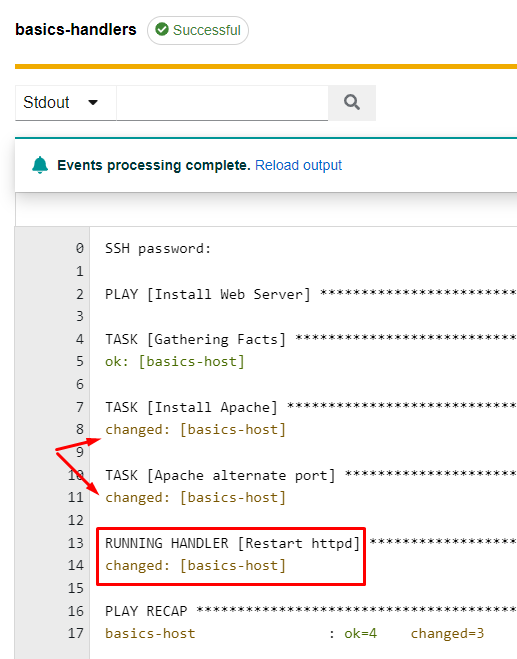
Notice how two tasks with notify options show changed, but only a single instance of the handler is run!